The Social Media Channel |
- LinkedIn will kill RSS support on December 19
- LinkedIn redesigns the inbox with larger pictures, centralized navigation, and message previews
- Buffer adds advanced analytics and restricted profiles to its social scheduling service for businesses
- Twitter launches broad match for keywords, lets advertisers target synonyms, different spellings, and tweet lingo
| LinkedIn will kill RSS support on December 19 Posted: 13 Dec 2013 08:37 AM PST  LinkedIn yesterday quietly sent out an email to some of its users announcing that its Network RSS feed will be retired on December 19. The company has thus given a week's notice for the feature. For those who have never used it before, the RSS feed allowed users to subscribe to their network updates via an RSS reader. The feed included the latest activity from people in your LinkedIn network, just like the LinkedIn homepage. There are two main reasons for the feature's removal. The first is the same one we've heard before: LinkedIn says it wants to focus its resources elsewhere (just like Google said when it announced Google Reader's retirement). The second isn't given explicitly, but LinkedIn alludes to it by saying that all updates and content can still be viewed on its website or via its mobile apps. In other words, the company has decided the feature isn't popular enough to warrant letting users browse content outside its service. Like so many companies before it, LinkedIn wants to keep users on its site. For reference, here's the full email:
See also – LinkedIn partners with 7 online education firms to let users add certifications and courses to their profiles and LinkedIn redesigns the inbox with larger pictures, centralized navigation, and message previews Top Image Credit: mariosundar / Flickr  This posting includes an audio/video/photo media file: Download Now |
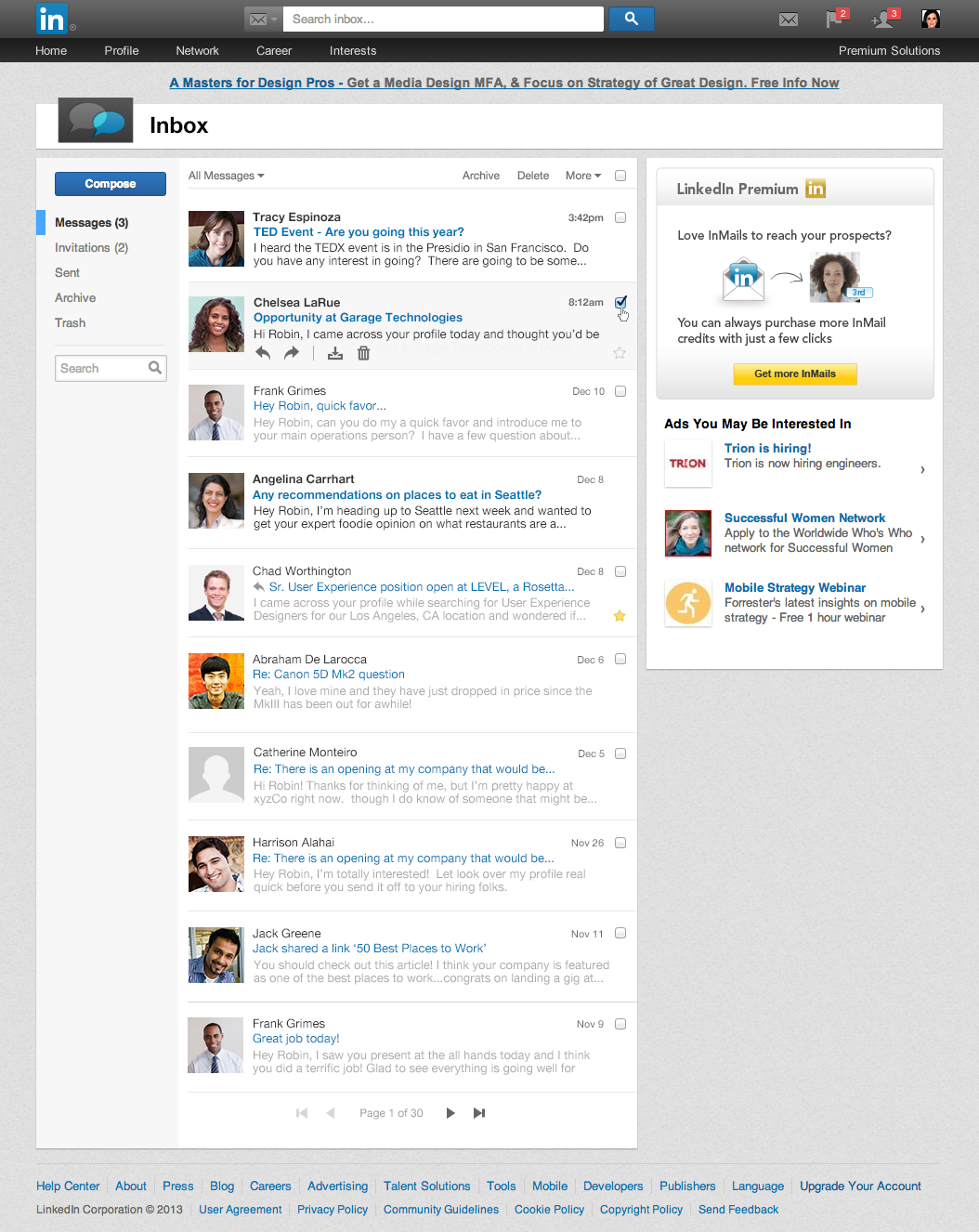
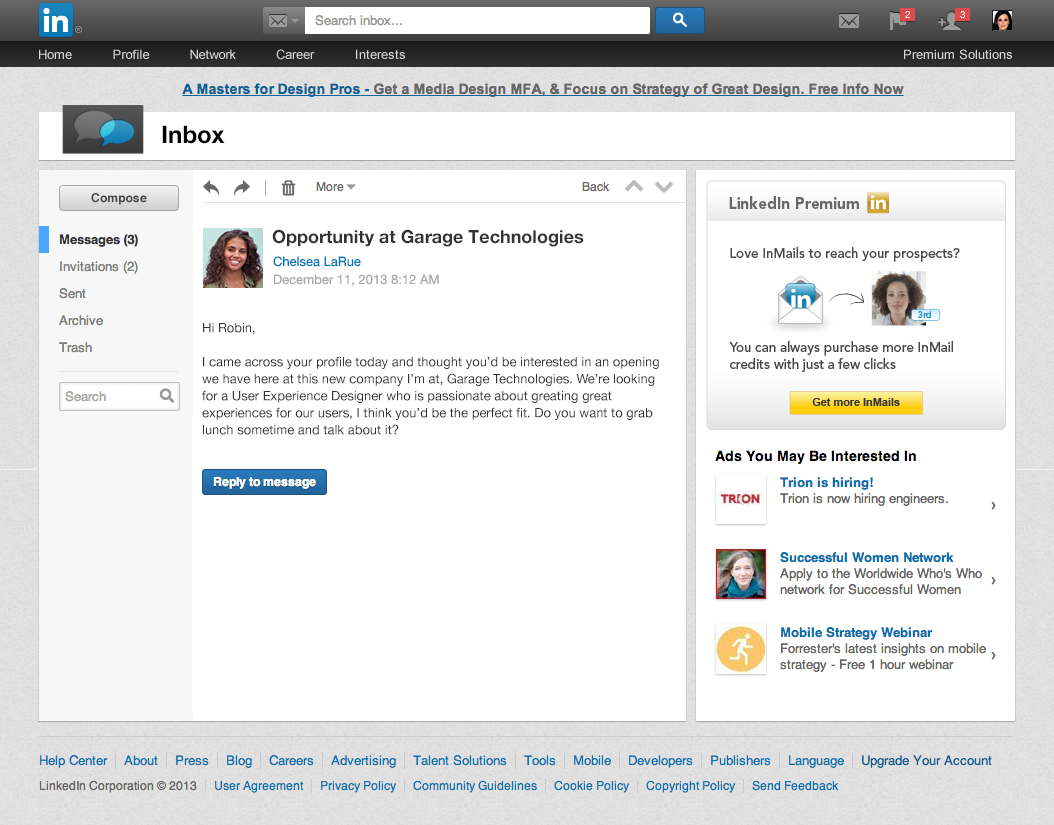
| LinkedIn redesigns the inbox with larger pictures, centralized navigation, and message previews Posted: 12 Dec 2013 09:00 AM PST  LinkedIn today launched a redesigned inbox to help its users manage and build their professional relationships. The revamped tool will become available to English-speaking members "over the next few weeks" and will roll out to all members around the world next year. LinkedIn explains the new inbox features a cleaner and streamlined new design with larger pictures, a new centralized navigation on the left side of the inbox and within each message, and a new preview of each message when browsing through your inbox. These changes work together to make it easier to manage your conversations, move between messages and invitations, as well as be able to scan through messages quickly if you don't have much time. Without further ado, here's the new inbox: And here is an opened message: Unfortunately, this new design suffers from the same issue as the last one: there is a huge amount of wasted space on the right-hand side. While we understand LinkedIn needs to reserve sections of its site for advertisements, it would be better if there was more horizontal room dedicated to the actual content when in the inbox. We're also disappointed there are still two search bars. It's difficult to understand how this was omitted: both currently appear to do the same thing. Isn't it enough that the top bar's text changes to "Search inbox…" when you're in the inbox. Scrap the second search bar already. LinkedIn says the inbox is one of the top five destinations on its service. Furthermore, it is also often where new connections and conversations begin, meaning it is critical to business insights and professional opportunities, creating partnerships, hires, and fostering new business. While this revamp seems to be a step forward, we would have expected more thought to go into it. It's as if LinkedIn threw on a new coat of paint and added some new features, but never actually went to the drawing board to figure out if the inbox might need to be rebuilt from scratch. Top Image Credit: mariosundar / Flickr  This posting includes an audio/video/photo media file: Download Now |
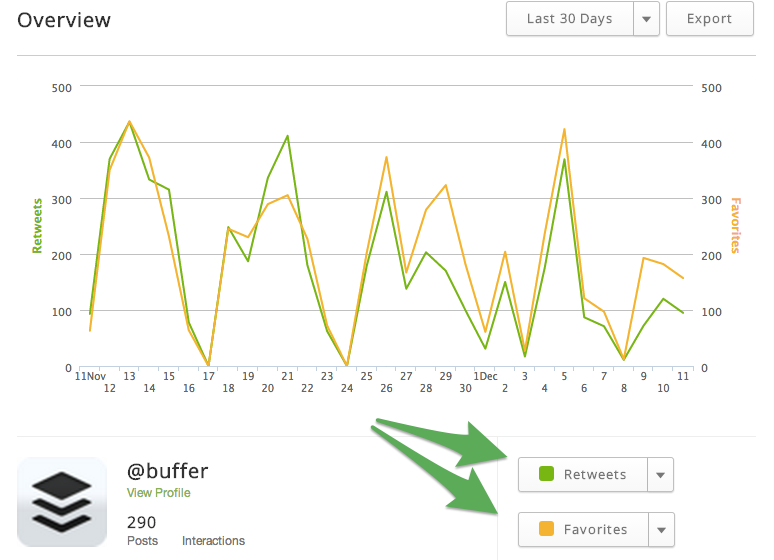
| Posted: 12 Dec 2013 06:00 AM PST  Buffer, a service for scheduling posts, updates and other content for social media accounts, today launched Buffer for Business, a subscription-based version targeting firms of all shapes and sizes. It supports multiple users on a single Buffer account, who can be set up as either a Manager or Contributor. The former denotes full access, while the latter blocks the new user from editing the schedule of any social media account, and restricts them from scheduling new posts unless they're approved by a Manager. Buffer for Business also offers more detailed analytics, including a series of graphs that illustrate the level of engagement for clicks, retweets and favorites tied to the user's connected social media accounts. Two drop-down menus nestled underneath this graph toggles individual metrics and can be used to compare multiple metrics simultaneously. For the first time, enterprise users can also download a copy of their data within the new export button, which Buffer says has been one of its most-requested features. Analytics data contained with the main table can be sorted too based on headers (date, post, clicks, retweets, favorites, etc.) which while a welcome addition, should really be available to all Buffer users. Buffer has been beta testing its new Buffer for Business offering since July, and says it already makes up 10 percent of its total revenue. These premium plans start at $50 per month for 5 users and 25 connected social media accounts, rising to $250 per month for 25 users and 150 accounts.  This posting includes an audio/video/photo media file: Download Now |
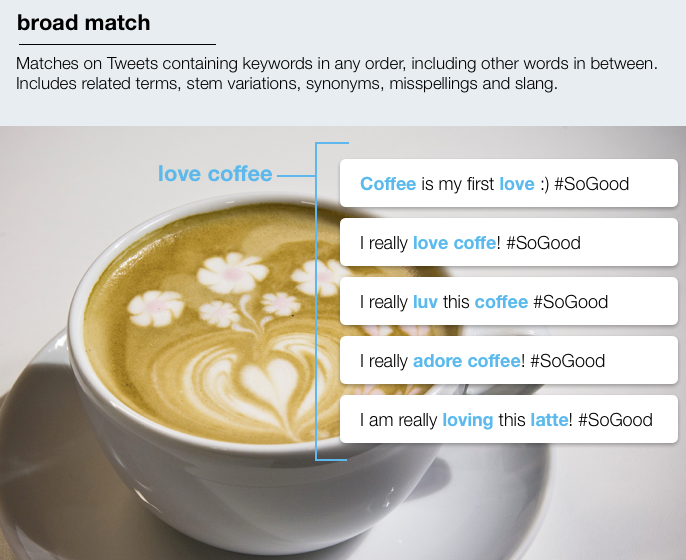
| Posted: 11 Dec 2013 11:21 AM PST  Twitter today launched broad match for keywords, making it easier for companies to sell ads against tweets. The move is part of an ongoing effort by the company to monetize its hundreds of millions of users. Twitter says its users have conversations about topics in different ways that express the same intent: by using synonyms, different spellings, or Twitter-specific lingo. The broad match feature helps advertisers reach users having these conversations by automatically expanding their targeted keywords to include related terms. Here is an example: Twitter explains that if a coffee shop wants to reach coffee enthusiasts, it may run a campaign targeting the broad match keywords "love coffee." This would allow the company to connect with users who are tweeting or engaging with tweets containing keywords like "luv coffee" and "love latte." If the coffee shop sells lattes but not espressos, it can use the "+" modifier on the broad matched terms to prevent broadening and targeting the wrong users. Targeting "love + latte" will match to users who tweet "luv latte," but not those who tweet "luv espresso." None of this is new: other keyword advertising platforms have been offering such functionality for ages. Yet on social networks like Twitter, features are of utmost importance as users interact with the service in unique ways: after all, they only have 140 characters to work with. Twitter says broad match is now available through ads.twitter.com and its advertiser API. Furthermore, broad match will be the default matching type for targeted keywords moving forward. Existing campaigns will remain unchanged and will be automatically opted into the "+" modifier to prevent broadening. As for users, Twitter reassures them that broad match for keywords will not change the frequency of ads they see. Users can also continue to dismiss Promoted Tweets they don't like. Top Image Credit: Scott Beale / Laughing Squid  This posting includes an audio/video/photo media file: Download Now |

| You are subscribed to email updates from The Next Web » Social Media To stop receiving these emails, you may unsubscribe now. | Email delivery powered by Google |
| Google Inc., 20 West Kinzie, Chicago IL USA 60610 | |